
A smart lock ownership cost comparison without subscription should start with the costs you keep paying after checkout, not only the lock price. For homeowners and renters, the biggest differences are usually installation, battery replacement, whether a hub is required, which features work locally, and how long the maker supports app and security updates.
Answer-first summary: The lowest-cost no-subscription smart lock is usually a simple keypad or Bluetooth model if you only need code entry at the door. Wi-Fi locks can cost more to own because of battery drain and app dependence. Hub-based or local smart-home locks can be economical for households that already own the hub and want automations without paying for cloud features.
What no-subscription smart lock ownership really means
No-subscription ownership means the lock does not require a paid monthly or annual plan for the core functions you care about. That may include keypad entry, phone-based unlocking, temporary access codes, activity history, remote locking, or smart-home routines, depending on the model. The key detail is that no-subscription does not always mean every advertised feature is free.
Manufacturers often separate features into local functions, free app functions, and paid cloud functions. A lock may work fine without a plan at the door, but charge for extended event history, advanced notifications, guest management, video pairing, or professional monitoring when bundled with a security system. Treat every feature list as model-specific and verify it in the product manual before buying.
If you are still choosing among lock styles, Home DVP has a separate comparison of current options in the best smart lock guide. This article focuses on ownership cost and no-subscription tradeoffs rather than ranking products.
Smart lock ownership cost comparison without subscription
The meaningful comparison is not smart lock versus smart lock. It is whether the lock keeps your needed features local, whether it depends on extra hardware, and whether normal upkeep will be easy for your household.
| Lock ownership path | Likely included without a subscription | Costs to check before buying | Best fit | Main caution |
|---|---|---|---|---|
| Keypad deadbolt or keypad lever | PIN entry at the door, manual key backup on some models, basic code management | Batteries, rekeying if needed, installation or locksmith help | Renters or homeowners who want simple keyless entry | Remote control may be absent or limited |
| Bluetooth smart lock | Phone unlocking nearby, app setup, local management on many models | Batteries, possible bridge if remote access is desired | Apartments, side doors, low-traffic doors | Phone access usually works only within local range unless extra hardware is added |
| Wi-Fi smart lock | App control, notifications, remote lock or unlock on many models | Batteries, stronger Wi-Fi coverage near the door, cloud account dependence | Owners who need remote access without a separate hub | More app and battery maintenance, and some cloud features may be paid |
| Hub-based smart lock | Local or hub-managed control when compatible, routines, shared automations | Hub purchase if not already owned, compatibility checks, batteries | Homes already using a smart-home hub | Value drops if the hub is bought only for one lock |
| Smart lock bundled with camera or security system | Basic lock operation may be free, depending on model | Subscription tiers, camera storage, monitoring, extra devices | Households already building a wider security setup | Bundled features can blur what is free versus paid |
Cost categories that matter more than the sticker price
Purchase price and included hardware
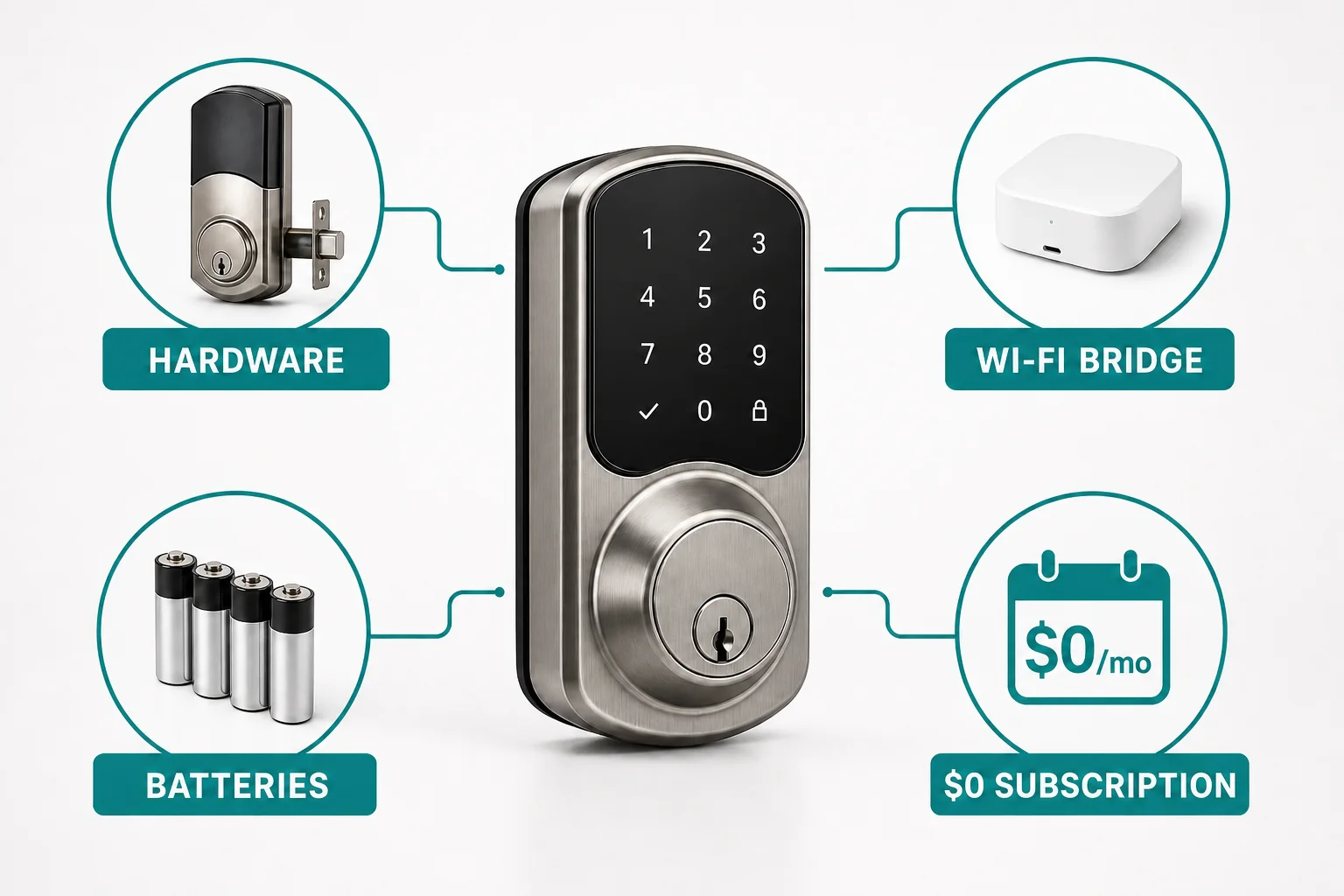
The lock body, interior thumb turn, strike plate, mounting hardware, keys, battery pack, and setup tools vary by model. A lock that seems cheaper can become more expensive if it needs a separate bridge, keypad accessory, door sensor, or hub to provide the functions you expected. Confirm what is in the box and what is optional.
Installation cost and door condition
Many smart deadbolts are designed for homeowner installation, but that assumes the existing door, latch, and strike align well. If the deadbolt rubs, sticks, or needs to be lifted to latch, the motor will work harder and may fail to lock reliably. Fix door alignment before judging battery life or lock quality.
Renters should also check lease terms before replacing a lock or changing keys. Some landlords require a copy of the key, prohibit lock changes without written permission, or require restoration at move-out. A retrofit lock that keeps the exterior key cylinder may reduce lease friction, but permission is still the safer path.
Batteries and power planning
Battery life is model-specific and depends on lock design, door fit, temperature, traffic, wireless connection quality, and notification settings. Avoid treating a brand estimate as a guarantee. Instead, check whether the lock gives low-battery warnings, whether batteries are easy to replace, and whether there is a documented emergency power or key backup method.
Hubs, bridges, and network equipment
A no-subscription lock can still need extra hardware. Bluetooth locks may need a bridge for remote access. Some locks use a smart-home hub for automations. Wi-Fi locks may not need a hub, but they do need reliable wireless coverage at the door. If your router signal is weak near an exterior door, network upgrades can become part of the real ownership cost.
Cloud accounts and app support
Most connected locks require an app account for setup or remote features. The FTC online privacy and security guidance encourages consumers to protect accounts with strong security practices, including careful password use and privacy awareness. For a smart lock, the account is part of the lock, so include account maintenance in your ownership plan.
Update and security maintenance
Connected devices need ongoing software attention. NIST consumer IoT guidance focuses on cybersecurity capabilities such as secure configuration, software updates, and protection of device data. Before buying, look for a clear update process, a support policy, and a way to remove old users when someone moves out or no longer needs access. You can review the official overview at NIST consumer IoT cybersecurity.
Worked example: comparing three no-subscription offers
Use this as a decision method, not a market price claim. Replace the sample numbers with the prices and feature terms you see from the manufacturer, retailer, installer, or property manager.
- Option A: A keypad deadbolt costs 130 at checkout, needs no hub, and gives code entry only at the door. You plan for batteries and no paid plan.
- Option B: A Wi-Fi lock costs 190, includes remote app control, and has no required subscription for basic use. You add batteries more often if your door is busy or Wi-Fi is weak.
- Option C: A hub-compatible lock costs 160, but remote use requires a hub you do not own. If the hub costs 80, the first-year hardware cost becomes 240 before batteries.
Now compare only the functions you will actually use. If you only need dog walker codes and do not need remote unlocking, Option A may be the lower-cost ownership path. If you frequently need to let in family while away, Option B may be worth the extra upkeep. If you already own the compatible hub, Option C may beat Option B because you are not buying the hub just for the lock.
Security and privacy costs that are easy to miss
A no-subscription lock can still create privacy and security work. You need to manage who has access, remove old codes, protect the account used to control the lock, and keep the app and firmware current when updates are available. These tasks do not show up on a receipt, but they affect safe ownership.
The FTC guidance for securing home security cameras is written for cameras, but the same consumer security habits are relevant to connected home security devices: use strong passwords, turn on extra account protection when offered, update software, and understand what data the device sends or stores. The official article is here: FTC guidance on securing home security cameras.
If your lock is paired with a doorbell camera, floodlight camera, or indoor camera, the ownership calculation changes. Storage, notifications, and monitoring features may be charged separately from the lock. For broader device planning, see Home DVP resources on security cameras and floodlight cameras.
No-subscription feature checklist before you buy
- List must-have functions: Decide whether you need keypad entry, phone unlocking, remote access, temporary codes, access logs, automations, or voice control.
- Ask what works with no plan: Check the manufacturer support page or manual for each must-have feature. Do not rely only on a product page headline.
- Confirm extra hardware: Look for required bridges, hubs, keypads, door sensors, or Wi-Fi extenders.
- Check renter permissions: Get written approval if the lock changes the exterior hardware, key cylinder, or landlord access.
- Inspect the door: The deadbolt should extend and retract smoothly by hand before you install a motorized lock.
- Plan access recovery: Know the backup method for a dead phone, dead battery, app outage, or lost credentials.
- Review account controls: Prefer locks that support strong account protection, easy user removal, and clear update procedures.
- Document ownership: Save the manual, admin account email, reset process, key code, and battery type in a secure household file.
Common mistakes that raise ownership cost
Buying Wi-Fi when local access is enough
Remote control is useful, but it is not free in practical terms. Wi-Fi locks tend to put more demand on setup, signal quality, app reliability, and battery management. If the door is used mainly by household members who are physically present, a keypad or Bluetooth-first lock may be simpler and cheaper to live with.
Ignoring the door before blaming the lock
Smart locks are often blamed for short battery life or failed locking when the door is actually misaligned. Before replacing batteries repeatedly, test the deadbolt with the door open and then closed. If it moves freely when open but binds when closed, the door, latch, or strike needs adjustment.
Assuming subscription-free means offline
Some locks operate locally for basic entry but still require a cloud account for setup, remote features, or notifications. Others can be managed mostly through a hub or local connection. Neither approach is automatically better. The right question is what happens if the internet is down and what functions still work at the door.
Forgetting move-out and turnover costs
Renters, landlords, and shared households should plan for turnover. Deleting a user code is easier than rekeying a cylinder, but only if the administrator account is available and the reset process is known. If the admin account belongs to a former tenant, roommate, or contractor, recovery may be inconvenient.
Maintenance implications of avoiding subscriptions
Without a subscription, you may avoid recurring plan charges, but you still own the routine care. Set a reminder to check battery status, remove old codes, review who has app access, and install available updates. If the lock uses a key backup, store the key where an authorized person can reach it during a phone or battery failure.
Also think about how the lock behaves during service disruptions. A basic keypad should still unlock locally if it has power. A remote app command may fail if the internet, cloud service, phone, or home network is down. That difference matters for caregivers, short-term guests, and households that rely on remote access.
When this advice does not apply
This comparison is for ordinary residential smart locks used by homeowners and renters. It does not cover commercial access-control systems, multifamily building entry systems, life-safety hardware, fire-rated door assemblies, or doors governed by specific local code or lease requirements. If your door has special hardware, required egress features, or shared-building access rules, check the property owner, manufacturer, and applicable local requirements before making changes.
Do not install a smart lock if the door cannot latch reliably, if the existing hardware is damaged, or if changing the lock could trap occupants or block required exit operation. If drilling, re-boring, wiring, or major door repair is needed, call a qualified locksmith, door professional, or property maintenance professional.
Smart lock ownership cost comparison without subscription: final choice
Choose the lock path that matches the simplest version of your real need. Pick a keypad lock if you want low-maintenance code entry at the door. Pick Bluetooth if nearby phone access is enough. Pick Wi-Fi if remote control is important enough to justify more app and battery attention. Pick hub-based only when you already have, or truly want, the compatible smart-home system.
The best no-subscription value is not the lock with the longest feature list. It is the lock that keeps your required features free, works with your door and lease, has a clear backup method, and gives you a manageable security routine.
How we prepared this guide
This guide was prepared as an informational cost-comparison article for 2026. It was checked against the cited FTC and NIST consumer guidance on connected-device security and privacy. Product features, subscription terms, battery expectations, compatibility, installation limits, and support periods are manufacturer-specific, so homeowners and renters should confirm those details in the current manual before buying or installing.