
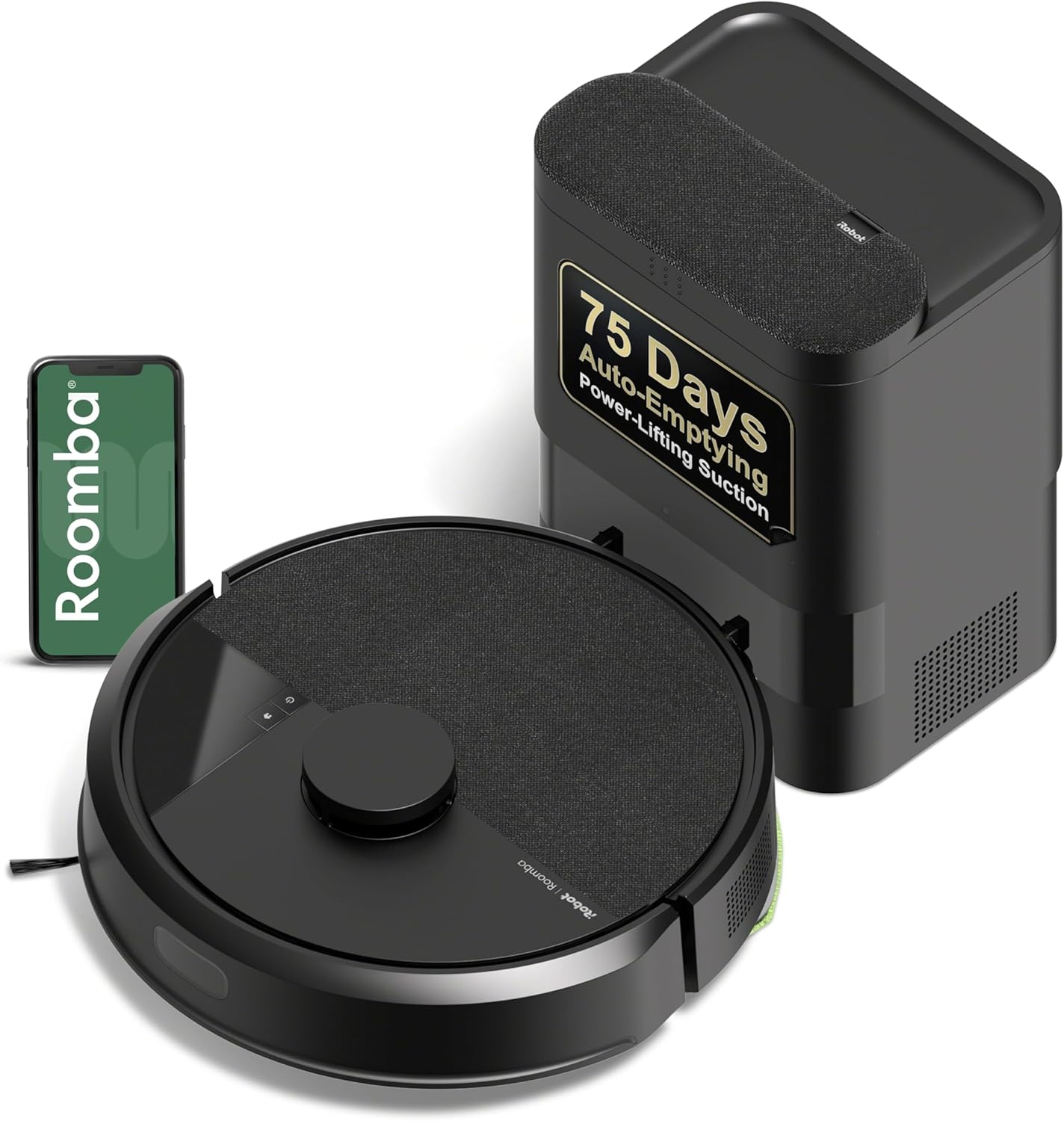
For vacuuming only, the iRobot Roomba 105 Vac Robot Vacuum with AutoEmpty costs $279 and claims up to 75 days between dock bag changes. For vacuuming and mopping, the $299 iRobot Roomba 105 Combo adds carpet avoidance while mopping. The Airzeen offers a lower listed price and 8,000 Pa suction; Shark offers a bagless base. These are manufacturer-listed features, not independent test results.
All four listed models cost less than $300 before any taxes or other charges. Prices and product details can change, so confirm the current listing and exact model before buying. The supplied ratings show zero reviews for each product, so they do not provide a useful basis for comparing buyer experience.
Compare the options
| Model | Self-emptying details | Best fit based on supplied features | Key limitation to consider |
|---|---|---|---|
| iRobot Roomba 105 Vac Robot Vacuum with AutoEmpty | Bagged dock; claims up to 75 days | Vacuum-only cleaning, room targeting, and LiDAR mapping | No mopping function |
| iRobot Roomba 105 Combo Robot Vacuum & Mop | Bagged dock; claims up to 75 days | Vacuuming and light mopping, with carpet avoidance while mopping | At budget limit; check whether its mopping approach suits your floors |
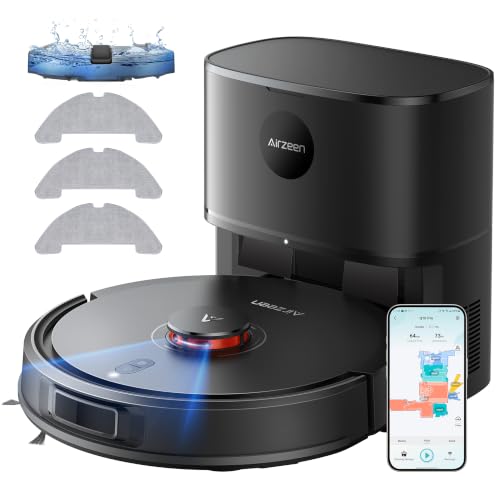
| Airzeen Robot Vacuum and Mop Self-Emptying | 3.3 L station; claims up to 60 days | Lower listed price, vacuuming and mopping, and stated 8,000 Pa suction | Instructions say to remove mop holder or set a no-go zone to prevent carpet wetting in mop mode |
| Shark AV2501AE AI Robot Vacuum with XL HEPA | Bagless base; claims up to 60 days | Bagless emptying, LiDAR mapping, and stated HEPA filtration | At budget limit; vacuum-only model |
Which one fits your home?
Choose Roomba 105 Vac for vacuuming and room controls
This model pairs a bagged AutoEmpty dock with ClearView LiDAR mapping. Its app supports schedules, room targeting, suction adjustments, cleaning-pass settings, and keep-out zones. The manufacturer claims up to 75 days of debris storage in the dock bag and says the bag traps 99% of allergens as small as 0.7 microns. Actual time between bag changes depends on debris and cleaning frequency; the supplied information does not establish a typical interval.
Skip it if you want a robot mop. Its supplied feature list describes vacuuming, not wet-floor cleaning.
Choose Roomba 105 Combo if carpet avoidance matters during mopping
The Combo model offers vacuum-only, mop-only, and combined modes, plus app controls for rooms, suction, cleaning passes, and water flow. Its listing says it detects and avoids carpets while mopping. That may reduce carpet wetting, but check the product instructions and your flooring manufacturer’s care guidance before using a mop function on any floor.
At $299, it leaves little room under the stated budget for add-ons. The supplied information does not list replacement mop-pad or bag costs.
Consider Airzeen for lower upfront price and stated suction
Airzeen lists 8,000 Pa suction, a 3.3 L self-emptying station, LiDAR mapping, and vacuuming and mopping modes at $259.99. Its stated dock interval is up to 60 days. The listing also describes app and voice control, but specifies 2.4 GHz Wi-Fi for app connectivity.
Pay close attention to carpet handling: the supplied instructions say to remove the mop holder or establish a no-go zone in mop mode to keep the robot from dirtying carpet. The stated suction figure alone does not show how well it cleans in practice; no test results were supplied.
Consider Shark if you prefer a bagless base
The Shark AV2501AE costs $299.99 and has a bagless base advertised to hold up to 60 days of debris. The listing describes LiDAR mapping, grid-pattern cleaning, object avoidance, and up to 120 minutes of runtime with recharge and resume. It also claims HEPA filtration captures 99.97% of dust and allergens down to 0.3 microns.
Its bagless base avoids buying dock bags, but the supplied details do not state how or when to clean the base or filter. Check maintenance instructions and replacement-part costs before choosing it. The model is vacuum-only, not a mop.
Buying checks before you choose
- Set a firm total budget. The listed prices are product prices; taxes and any replacement bags, filters, or mop pads are not included.
- Choose bagged or bagless emptying. Roomba models use dock bags; Shark is listed as bagless. Airzeen’s supplied details describe a 3.3 L station but do not specify whether it uses a bag.
- Match mopping to your floors. Confirm your flooring manufacturer’s care rules and the robot’s exact-model instructions. Do not assume every floor tolerates robot mopping.
- Check dock space and placement. The supplied information does not give dock dimensions or clearance requirements. Confirm those details in the exact model’s documentation.
- Review connectivity needs. Airzeen specifies 2.4 GHz Wi-Fi. Confirm network and voice-assistant compatibility for any model before purchase.
- Plan for upkeep. Self-emptying reduces routine bin emptying; it does not eliminate maintenance. Check instructions for brush, filter, dock, and mop-pad care.
Frequently asked questions
Which listed model costs the least?
Airzeen has the lowest supplied price at $259.99. Confirm the current listing price before buying.
Do these dock claims mean you can go that long without maintenance?
No. The 60- and 75-day figures are manufacturer claims for debris capacity, not a guarantee of time between all maintenance tasks. Cleaning frequency and the amount of debris affect how often the dock needs attention.
Which models can mop?
The iRobot Roomba 105 Combo and Airzeen list vacuuming and mopping. Roomba says it avoids carpets while mopping; Airzeen’s supplied instructions call for removing the mop holder or setting a no-go zone to prevent carpet wetting. Roomba 105 Vac and Shark AV2501AE are vacuum-only models in the supplied product details.
Are the listed ratings enough to pick a winner?
No. Each supplied product record shows zero reviews, so the listed rating figures have no review count to support a meaningful comparison. Choose based on features, budget, floor-care needs, and exact-model instructions instead.
Pros
- AutoEmpty dock cuts hands-on maintenance to bag changes every 75 days
- Three-stage system with strong suction and dual brushes covers multi-surface dirt well
Cons
- Operates only on 2.4 GHz WiFi for setup and ongoing use
- Vacuum-only design leaves wet cleaning tasks for separate tools
Specifications
| Surface Recommendation | Carpet & Hard Floor |
|---|---|
| Other Special Features of the Product | Anti-Fall, Dirt Detection Sensor, Eco Mode, Edge Cleaning, LiDAR Navigation |
| Controller Type | App Control, Button Control, Voice Control |
| Filter Type | Cartridge |
| Battery Life | 200 minutes |
| Cleaning Path Width | 5.8 Inches |
| Battery Type | Lithium Ion |
| Voltage | 2.4 Volts |
| Capacity | 0.1 gallons |
| Power Source | Battery Powered |
Verify the current product variation before purchase; specifications may change.
Best For / Avoid If
Best for buyers prioritizing
- AutoEmpty dock cuts hands-on maintenance to bag changes every 75 days
- Three-stage system with strong suction and dual brushes covers multi-surface dirt well
- LiDAR mapping delivers precise navigation and full-home coverage
Consider another option if
- Operates only on 2.4 GHz WiFi for setup and ongoing use
- Vacuum-only design leaves wet cleaning tasks for separate tools
- Periodic brush cleaning, filter changes every 3-6 months, and contact wiping remain necessary

Pros
- Extended dock capacity minimizes intervention over many weeks
- Carpet detection feature prevents wet messes on rugs during mop cycles
Cons
- Setup requires a 2.4 GHz Wi-Fi network for initial connection
- Users must still perform occasional filter changes and brush maintenance
Specifications
| Surface Recommendation | Carpet & Hard Floor |
|---|---|
| Other Special Features of the Product | Anti-Fall, Dirt Detection Sensor, Eco Mode, Edge Cleaning, LiDAR Navigation, Logical Navigation, Obstacle Avoidance, Scheduling, Self-Emptying, Simultaneous Vacuuming & Mopping, Smart Mapping, Wet/Dry |
| Controller Type | App Control, Button Control, Voice Control |
| Filter Type | Cartridge |
| Battery Life | 100 minutes |
| Battery Type | Lithium Ion |
| Power Source | Battery Powered |
| Batteries are Included | Yes |
| Control Method | App, Touch, Voice |
| Form Factor | disc-shaped |
Verify the current product variation before purchase; specifications may change.
Best For / Avoid If
Best for buyers prioritizing
- Extended dock capacity minimizes intervention over many weeks
- Carpet detection feature prevents wet messes on rugs during mop cycles
- Three cleaning modes plus app controls offer flexible daily routines
Consider another option if
- Setup requires a 2.4 GHz Wi-Fi network for initial connection
- Users must still perform occasional filter changes and brush maintenance
- Mapping may require updates when furniture layouts change significantly
Pros
- Large 3.3L station reduces how often debris needs manual emptying
- LiDAR mapping helps organize routes and avoid common obstacles such as walls, stairs, and toys
Cons
- Mop mode needs carpet protection through mop-holder removal or a designated no-go zone
- Voice and app connectivity require 2.4GHz WiFi
Specifications
| Color | Black |
|---|---|
| Size | Medium |
| Dimensions | 13.6 x 12.9 x 13.6 inches |
| Product Group | Home |
Verify the current product variation before purchase; specifications may change.
Best For / Avoid If
Best for buyers prioritizing
- Large 3.3L station reduces how often debris needs manual emptying
- LiDAR mapping helps organize routes and avoid common obstacles such as walls, stairs, and toys
- Alexa and Google Assistant support adds hands-free control over scheduled or on-demand cleaning
Consider another option if
- Mop mode needs carpet protection through mop-holder removal or a designated no-go zone
- Voice and app connectivity require 2.4GHz WiFi
- The 13.6 x 12.9 x 13.6-inch station footprint may require dedicated floor space

Pros
- Self-emptying base minimizes how often the dustbin needs manual attention.
- LiDAR vision supports efficient routes and reliable obstacle detection.
Cons
- Initial Precision Home Mapping setup can take extra time for first-time users.
- The XL self-empty base requires dedicated floor space near a power outlet.
Best For / Avoid If
Best for buyers prioritizing
- Self-emptying base minimizes how often the dustbin needs manual attention.
- LiDAR vision supports efficient routes and reliable obstacle detection.
- Works on both carpet and hard floors with strong suction power.
Consider another option if
- Initial Precision Home Mapping setup can take extra time for first-time users.
- The XL self-empty base requires dedicated floor space near a power outlet.
- Larger floor plans may still need the recharge-and-resume cycle to complete a full clean.